
In the realm of digital gaming, particularly in slot experiences, the visibility of instructions plays a critical role in shaping user engagement, satisfaction, and retention. Players approach slot games with varying degrees of familiarity, and a clear, well-structured instruction set can bridge knowledge gaps, reduce frustration, and foster a sense of confidence. When players understand not only the basic mechanics of a game but also the nuances of bonuses, pay lines, and special features, they are more likely to immerse themselves in extended play, trusting that their decisions are informed and meaningful.
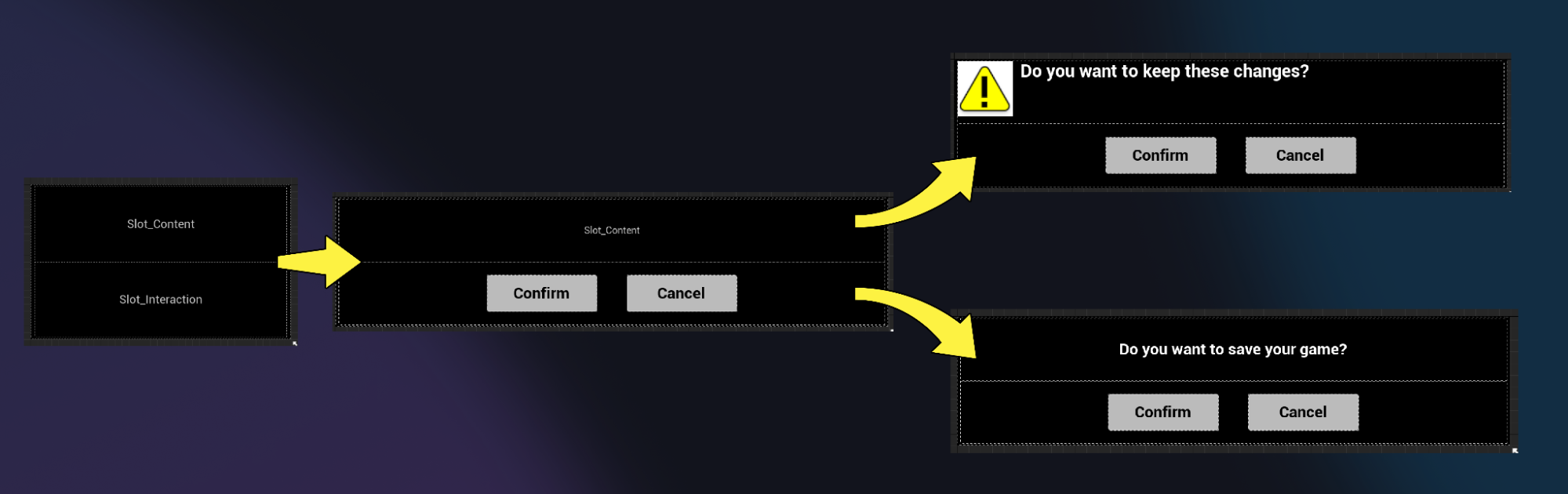
Instruction visibility begins with the strategic placement of guidance within the user interface. Slot designers often wrestle with balancing visual simplicity against informational completeness. Overcrowding the screen with text can overwhelm or intimidate casual players, while burying instructions in multiple menus or hidden pop-ups risks creating confusion and disengagement. Optimal placement involves leveraging contextual cues, tooltips, and modal windows that appear precisely when a player encounters a new mechanic or feature. This dynamic approach ensures that instructions are not merely accessible but actively guide player behavior at moments of need.
Beyond placement, the formatting and language of instructions profoundly influence comprehension. Concise, actionable phrasing, combined with visually distinct highlighting, helps players quickly parse critical information. Hierarchical text structures, such as headings, bullet points, and progressive disclosure, allow users to digest instructions in stages rather than confronting a wall of text. Visual indicators, including icons or animation, can complement textual instructions, providing immediate recognition and reducing cognitive load. For example, when a bonus round is triggered, a subtle animation drawing attention to the relevant symbol can serve as both instruction and engagement cue, blending clarity with entertainment.
Personalization is another layer of instruction visibility strategy. Different players exhibit different levels of gaming experience and tolerance for guidance. Offering optional walkthroughs, adjustable instruction verbosity, or contextual hints allows the interface to adapt to individual user needs. New players may benefit from an interactive tutorial that walks them through spins, paylines, and bonus mechanics, while experienced players might prefer minimal cues that reinforce rather than explain. By empowering users to control the depth and timing of instruction exposure, designers respect player autonomy while maintaining clarity, a key factor in user satisfaction and retention.
Consistency across sessions and devices reinforces instruction visibility. When a player switches from desktop to mobile or from one game variant to another, maintaining recognizable instructional patterns—placement, iconography, and interaction behavior—reduces the cognitive cost of adaptation. This consistency fosters trust and comfort, signaling that the platform is coherent and that learning in one context translates to others. Furthermore, subtle reinforcement mechanisms, such as brief reminders of payline structures or bonus triggers, can re-establish understanding without interrupting gameplay flow, maintaining an ongoing sense of competence.
Integrating feedback loops within instruction strategies amplifies their effectiveness. When players act according to instructions and receive immediate, clear feedback, the instructional system validates itself. For instance, highlighting winning lines or showing visual confirmation when a special feature activates reinforces understanding of rules and mechanics. Conversely, unclear outcomes or lack of confirmation can undermine instructional clarity, leading to player frustration. Effective feedback ensures that visibility is not static; it is part of a dynamic, interactive dialogue between the player and the game interface.
Accessibility considerations intersect directly with instruction visibility. Players with visual, cognitive, or motor impairments may require alternative presentations of instructions, including adjustable font sizes, high-contrast modes, screen reader compatibility, and simplified interaction patterns. Inclusive design ensures that instruction visibility is universal, enabling a broader player base to engage meaningfully with the game. Additionally, accommodating accessibility needs often benefits all players by clarifying instructions, reducing visual clutter, and emphasizing core mechanics.
Another facet of instruction visibility strategy lies in managing attention. Designers must prioritize what information is critical at any moment and distinguish it from secondary or optional content. Highlighting immediate actions, such as which button to press or how a bonus round operates, takes precedence over background rules that can be consulted as needed. By structuring information according to urgency and relevance, the interface guides the player naturally, reducing cognitive friction and maintaining engagement. Subtle animations, color differentiation, and temporary emphasis cues can draw attention without overwhelming the senses, creating a flow that balances instruction with gameplay immersion.
Finally, the timing of instruction delivery can profoundly affect the user experience. Static instruction screens at the start of a game may be skipped or forgotten, while context-sensitive guidance that appears during the gameplay moment ensures comprehension. Incremental learning, where instructions are revealed progressively as the player encounters new features, aligns with cognitive learning principles and enhances retention. This method allows users to explore the game actively, integrating new knowledge into practice rather than absorbing it passively.
In conclusion, instruction visibility in slot UX is not merely about providing information—it is a strategic tool that shapes player perception, competence, and enjoyment. Effective visibility requires careful consideration of placement, format, personalization, consistency, feedback, accessibility, attention management, and timing. By treating instructions as an interactive, adaptive component of the game rather than a static appendage, designers can create experiences that are intuitive, engaging, and satisfying. Players feel empowered, confident, and in control, which not only enhances immediate enjoyment but also fosters long-term loyalty to the platform. Well-executed instruction visibility transforms the interface from a simple medium for gameplay into a nuanced guide that supports, teaches, and entertains simultaneously.




Leave a Reply